Trading range widget for your website
Where the price of each of 100 coins sits inside its trading range: Range Low, Equilibrium, Range High and the zone — Discount, Equilibrium or Premium. Updated every 5 minutes. Free, with a link to the source.
1. Widget builder
2. A self-updating image
For places where scripts are not allowed: forums, GitHub README, Notion, newsletters, Telegram posts. The image is redrawn every 15 minutes.
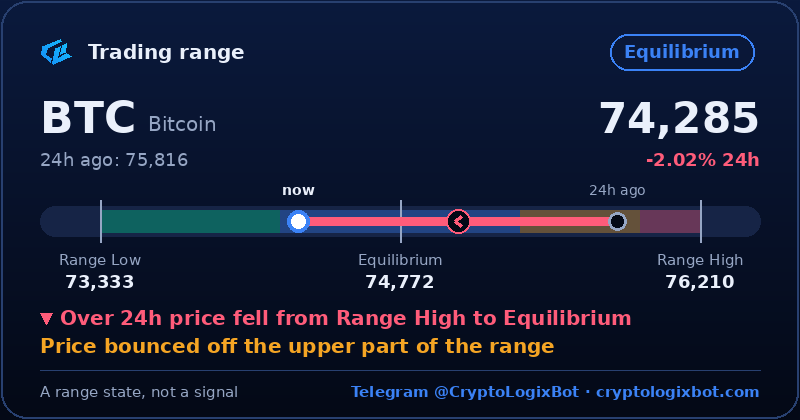
https://cryptologixbot.com/w/img/zone/btc-en-dark.pngURL: /w/img/zone/<coin>-<ru|en>-<dark|light>.png. Coin, language and theme follow the builder above.
3. Open API (JSON)
For bots, spreadsheets and your own services. No key, CORS enabled, updated every 5 minutes. One condition — a visible link to cryptologixbot.com.
GET https://cryptologixbot.com/w/api/zone.jsonall 100 coins"btc": {
"coin": "BTC", "price": …, "chg24": …,
"range_low": …, "equilibrium": …, "range_high": …,
"pos": 0.22, // price position in the range: 0 = Range Low, 1 = Range High
"zone": "disc" // disc | eq | prem | over | below | above
}
curl -s https://cryptologixbot.com/w/api/zone.json | jq '.coins.eth | {zone, pos, range_low, range_high}'
4. In Telegram
In any chat, group or channel type the bot name and a coin — the range card is posted with the image and levels. Nothing to install.
@CryptoLogixBot btc
In the bot itself and in groups it was added to:
/range BTC   // coin card
/range       // coins closest to Range Low
Terms
- Free for websites, blogs, channels and apps, including commercial ones.
- The link to cryptologixbot.com stays visible.
- The widget shows the state of the trading range — it is not an entry signal and not investment advice.
- How the range is built and what the zones mean — how to read it.